

Introduction to Ubersuggest: Keyword Research
In this first chapter, we dive into the fascinating world of Ubersuggest, an indispensable tool for any digital marketing and SEO professional. We will explore in depth what Ubersuggest is, how it works, and what advantages it offers for keyword research.
What is Ubersuggest?
Ubersuggest is a keyword research tool developed by Neil Patel, one of the most renowned experts in digital marketing. It is a powerful software that allows users to identify the most relevant keywords for their website and their specific niche.
How does Ubersuggest work?
Ubersuggest works by collecting and analyzing data from various sources such as Google Keyword Planner, Google Suggest, and other keyword databases. The tool then uses this data to generate relevant keyword suggestions, along with search volume data, competition, and other key metrics.
The Benefits of Using Ubersuggest
- Identifying Relevant Keywords: Ubersuggest lets you explore a wide range of keywords relevant to your niche, helping you effectively target your intended audience.
- Competitive Analysis: With Ubersuggest, you can analyze the keywords used by your competitors, as well as their positioning in search results, allowing you to better understand the competitive landscape.
- Content optimization: By using Ubersuggest, you can optimize your website content based on the most searched keywords in your field, which can improve your ranking in search results.
- Ranking Tracking: Ubersuggest also offers rank-tracking features, allowing you to monitor the position of your keywords in search results and adjust your strategy accordingly.
Account Creation and Setup
In this chapter, we will cover the steps required to create an Ubersuggest account and complete the initial setup for optimal use of the tool.
Creating an Ubersuggest Account (7-day free trial)
- Access to the Ubersuggest Website: Go to the Ubersuggest website using your preferred web browser.
- (50–100 vol), On the homepage, look for the sign-up or create-account button. Click it to start the registration process.
- Registration Form: Fill in the registration form with your personal information such as your name, email address, and a secure password.
- Email Address Validation: After submitting the registration form, you will likely need to verify your email address by clicking a confirmation link sent to your inbox.
- Connection: Once your account is created and your email address confirmed, log in to Ubersuggest using your credentials.
Profile Configuration
Now that you have created an account on Ubersuggest, you need to configure your profile to start using the tool optimally.
- Accessing Account Settings: Once logged in, look for the settings or account configuration option in the navigation menu.
- Personal Information: Check and update your personal information as needed, such as your name, email address, and password.
- Preferences: Explore the various preference options available, such as preferred language and notification settings, and adjust them to suit your needs.
- Integrations: If you use other tools or platforms, check whether integrations with Ubersuggest are available and set them up if needed.
- Billing settings: If you opt for a paid subscription, make sure to correctly configure your billing information to avoid any interruption of service.
Core Features of Ubersuggest
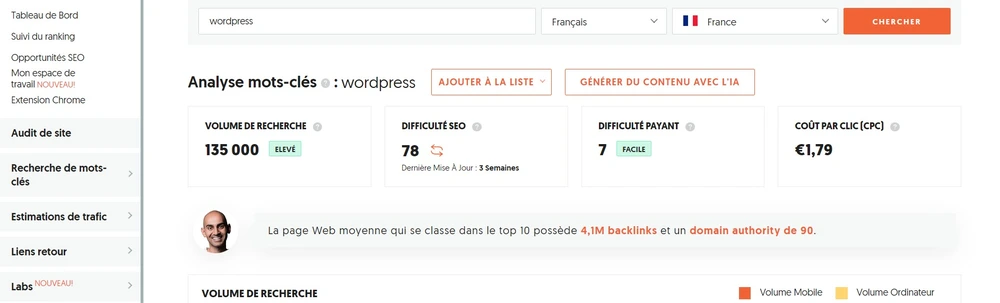
In this chapter, we will dive into the core features of Ubersuggest. These features form the foundation of using the tool and allow you to conduct keyword research, analyze the competition, and much more.
Collaborative playlist

Keyword research is one of the main features of Ubersuggest. Here is how to use it:
- Keyword Entry: Enter a keyword relevant to your niche or topic in the search bar.
- Results Analysis: Ubersuggest will generate a list of keyword suggestions based on your query, along with information such as monthly search volume, ranking difficulty level, and estimated cost per click (CPC).
- Exploring Suggestions: Explore the various keyword suggestions and examine the metrics to identify the most relevant keywords for your content.
Ranking Tracking
Ubersuggest also offers rank-tracking features to allow you to monitor the performance of your keywords over time. Here is how to use it:
- Adding Keywords: Add the keywords you want to track in your Ubersuggest dashboard.
- Change monitoring: Ubersuggest provides you with data on the ranking fluctuations of your keywords, allowing you to quickly detect trends and opportunities.
- ! we can move on to the Use this data to assess the effectiveness of your content strategy and search engine optimization, and make the necessary adjustments to improve your rankings.
By mastering these core Ubersuggest features, you will be able to conduct effective keyword research, analyze the competition, and monitor your website's performance in search results. In the following chapters, we will explore more advanced Ubersuggest features and strategies for optimizing your use of the tool.
Understanding the Data Provided by Ubersuggest
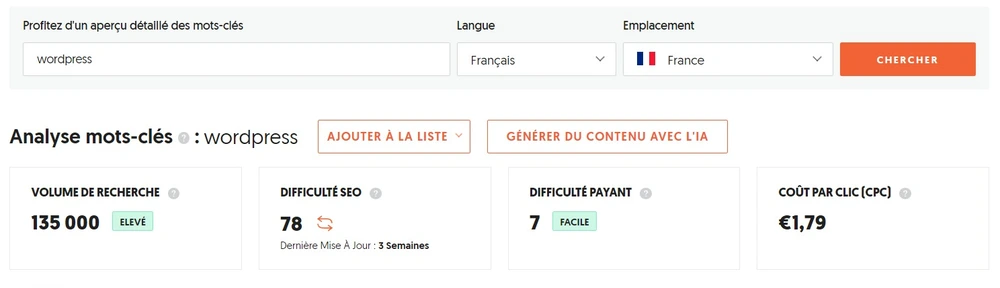
In this chapter, we will dive into analyzing the data provided by Ubersuggest. Understanding this data is essential for making informed decisions about keyword research and optimizing your website for search engines.
Monthly Search Volume
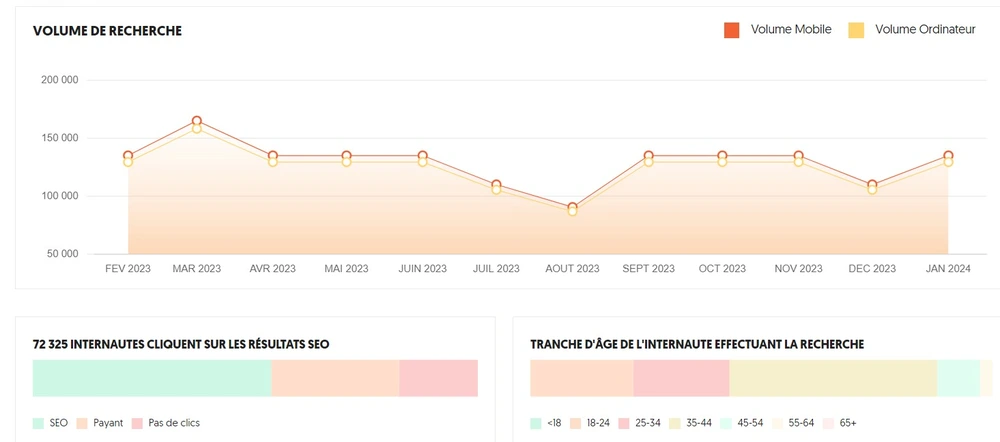
Monthly search volume represents the average number of searches performed for a given keyword over the course of a month. This metric indicates the relative popularity of a keyword and helps you assess its organic traffic potential.
Ranking Difficulty
Keyword difficulty is an estimate of how competitive a given keyword is. The higher the difficulty, the harder it will be to rank in the top positions for that keyword. This metric helps you assess the feasibility of ranking for a specific term.
Estimated Cost per Click (CPC)
The estimated cost per click (CPC) represents the average amount advertisers pay for a click on an ad based on that keyword. This metric is particularly relevant for paid advertising campaigns, but can also give you an idea of the potential value of a keyword in terms of qualified traffic.
Search trend
The search trend indicates whether the search volume for a given keyword is rising, falling, or stable over time. This metric allows you to identify emerging trends in your niche and adjust your strategy accordingly.
Keyword Research
Relevant keyword research is an essential step in any SEO and content marketing strategy. In this chapter, we explore in detail how to use Ubersuggest to conduct relevant keyword research for your niche or topic.
1. Enter the Main Keyword
To start, enter your main keyword in the Ubersuggest search bar. This can be a general term related to your niche or a specific topic you want to focus on.
2. Keyword Suggestion Analysis
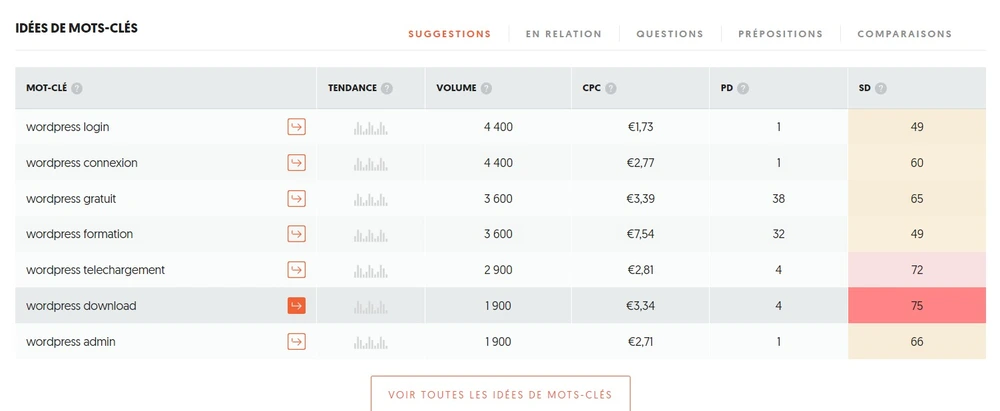
Once you have entered your main keyword, Ubersuggest will generate a list of associated keyword suggestions. Explore these suggestions to identify relevant and popular keywords in your field.
3. Results Filtering
Use the filtering options available in Ubersuggest to refine your results. You can filter keywords by monthly search volume, ranking difficulty, cost per click (CPC), and other relevant metrics.
4. Key Metrics Analysis
Take the time to examine the key metrics associated with each keyword, such as monthly search volume, ranking difficulty, and CPC. This will help you determine which keywords are most relevant and most profitable for your strategy.
5. Selection of Appropriate Keywords
Once you have analyzed the data, select the keywords that best match your content and marketing objectives. Choose relevant keywords with a sufficiently high search volume and a reasonable ranking difficulty.
6. Use in Your Content
Integrate your selected keywords into your content naturally and relevantly. Make sure to include them in titles, meta tags, and body text to optimize your ranking in search results.
You can find an article covering how to Creating a WordPress article with proper SEO best practices
Competitive Analysis
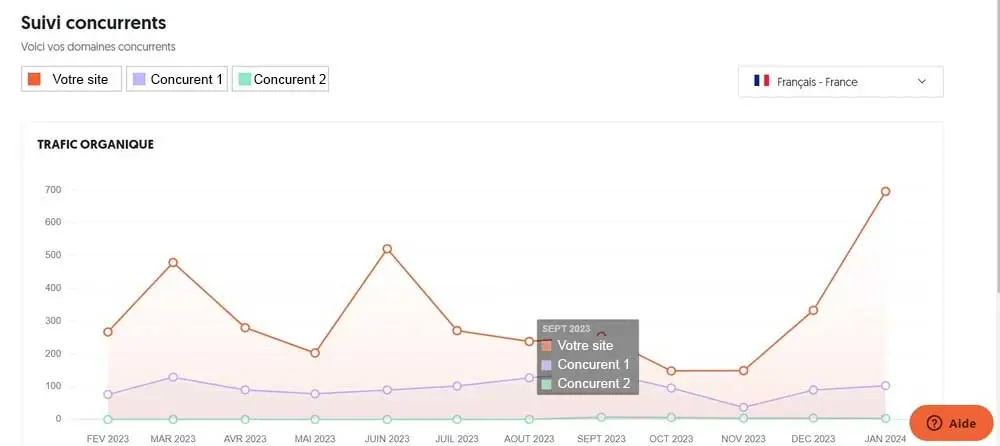
Competitive analysis is a critical strategy in the world of SEO and online marketing. Understanding what your competitors are doing and how they rank in search results can give you a significant competitive edge. In this chapter, we will explore how to use Ubersuggest to analyze the competition and identify opportunities for your own SEO strategy.
Enter Competitor URL
To get started, enter a competitor's website URL in the Ubersuggest search bar. Ubersuggest will then provide information on the keywords for which that site ranks in search results.
Ranked Keywords Analysis
Explore the list of keywords for which your competitor ranks. Identify the most relevant and popular terms in your niche, as well as those your competitor focuses on most.
Examination of Key Metrics
Analyze the key metrics associated with each keyword, such as monthly search volume, keyword difficulty, and CPC. This will help you assess the appeal of each term and identify opportunities for your own content and SEO strategy.
Comparison with Your Own Keywords
Compare the keywords your competitor ranks for with the ones you currently target. Identify gaps in your own strategy and look for opportunities to target similar or complementary keywords.
Backlink analysis
In addition to keywords, Ubersuggest will also provide you with information on the backlinks pointing to your competitor's site. Analyze these backlinks to understand their quality and origin, and identify opportunities to strengthen your own backlink profile.
Identification of Strengths and Weaknesses
In summary, use Ubersuggest to analyze the competition and identify your competitors' strengths and weaknesses. Use this information to refine your own content and SEO strategy, and look for opportunities to stand out in your niche.
By using Ubersuggest to analyze the competition, you will better understand the competitive landscape in your field and develop a more effective SEO strategy. Stay alert to trends and changes in your niche to stay ahead of the competition.
Advanced Use of Ubersuggest
In this chapter, we will explore the advanced features of Ubersuggest that will allow you to go beyond simple keyword research and gain deeper insights into your target market and competitors.
Search Trend Analysis
One of Ubersuggest's advanced features is search trend analysis. This feature lets you visualize search trends for different keywords over time. You can identify popular topics and seasonal content opportunities to better plan your content strategy.
Competitor Backlink Strategy Analysis
Ubersuggest also lets you analyze your competitors' backlink strategy. You can see which sites link to your competitors, as well as the quantity and quality of those backlinks. This gives you valuable insight into the link-building tactics that work in your niche and lets you adapt your own strategy accordingly.
Keyword Tracking Across Multiple Countries
If you are targeting an international market, Ubersuggest allows you to track your keywords across multiple countries. You can monitor keyword ranking variations by country and adapt your content and SEO strategy accordingly for each market.
Data Export
Ubersuggest also offers the ability to export keyword research and competitor analysis data in CSV format. This allows you to analyze the data more deeply, share it with other team members, or use it in other analytics tools.
Content Planning
Using the data provided by Ubersuggest, you can plan your content more strategically. You can identify popular topics and keywords in your niche, track search trends, and build an editorial calendar based on that data to maximize the impact of your content.
Content Optimization for Keywords
Optimizing content for keywords is a crucial step in any SEO strategy. In this chapter, we will explore in depth the best practices for effectively integrating keywords into your content while maintaining its quality and relevance.
Campsite Showcase Pack — €2,490 ex-VAT
Before you start optimizing your content, make sure to conduct a thorough analysis of the relevant keywords for your niche. Use Ubersuggest to identify the most-searched keywords among your target audience and those used by your competitors.
Natural Keyword Integration
When you integrate keywords into your content, make sure to do it in a natural and organic way. Avoid keyword stuffing, which can be perceived as spam by both search engines and users.
Usage in Headings and Subheadings
Keywords must be integrated into headings and 15–25 days of your content to reinforce their importance in the eyes of search engines. Use them judiciously to capture readers' attention and improve the readability of your content.
real-time recommendations
Don't forget tooptimize meta tags of your content, in particular the title tags and meta descriptions. Integrate your keywords naturally into these elements to improve the ranking of your content in search results.
Outdoor hospitality website
Integrate your keywords strategically within the main content of your page or article. Distribute them evenly throughout the text to ensure an appropriate keyword density.
Quality Content Creation
Always ensure you create quality, informative content that provides genuine added value to your readers. Search engine optimization should never compromise the quality or relevance of your content.
Use of Synonyms and Variants
In addition to incorporating your primary keywords, also use synonyms and variants to enrich your content. This improves its relevance and variety while addressing the different search queries of your target audience.
Testing and Measuring Results
Once your content is optimized, closely monitor results using analytics tools such as Google Analytics and Ubersuggest. Analyze the performance of your keywords and make adjustments as needed to improve your ranking and visibility.
Ranking and Performance Tracking
Tracking rankings and performance is a crucial step in any SEO strategy. In this chapter, we will explore how to use Ubersuggest to monitor your search ranking and evaluate your website's performance.
Hotels / para-hotel accommodation
To get started, add the keywords you want to track to your Ubersuggest dashboard. You can select the keywords you have targeted in your content or those you want to focus your attention on.
Ranking Change Monitoring
Ubersuggest will provide you with information on how your keyword rankings evolve over time. You will be able to see how your position changes in search results and quickly detect positive or negative trends.
Performance Analysis
Use the data provided by Ubersuggest to evaluate your website's performance in search results. Analyze ranking variations, search volume, and other metrics to identify areas where improvements are needed.
Comparison with the competition
Compare your ranking with that of your competitors to better understand your market positioning. Identify the areas where you can outperform the competition and develop a strategy to strengthen your online presence.
Strategy Adjustment
Use ranking and performance tracking data to adjust your content and SEO strategy. Identify the keywords generating the most traffic and focus your efforts on optimizing them to maximize your online visibility.
Reports and Analysis
Ubersuggest offers reporting and analytics features that let you easily visualize ranking and performance tracking data. Use these reports to communicate results to your team or clients and to make informed decisions in digital marketing.
In summary, tracking rankings and performance is essential for evaluating the effectiveness of your SEO and content strategy. With Ubersuggest, you have a powerful tool to monitor your search rankings, analyze your website's performance, and make strategic decisions to improve your online visibility.
Tips and Tricks for Optimal Use
In this chapter, we will explore some advanced tips and tricks to get the most out of Ubersuggest and optimize your user experience.
Use Advanced Filters
Ubersuggest offers a range of advanced filters that allow you to refine your keyword searches. Experiment with these filters to narrow your results and find even more relevant keywords for your strategy.
Explore Search Trends
Use Ubersuggest’s search trends feature to identify trending topics and keywords in your niche. This will help you stay up to date with the latest trends and create relevant, high-impact content.
Track your Competitors
Use Ubersuggest's competitor analysis feature to track your competitors' keyword strategies. Identify the keywords they rank well on and look for opportunities to improve your own positioning.
Explore Content Suggestions
Ubersuggest also offers content suggestions based on the keywords you search for. Explore these suggestions to find relevant, engaging content ideas for your target audience.
Plan your Content Campaigns
Use Ubersuggest's content planning feature to plan your content campaigns in advance. Create keyword lists, editorial calendars, and content goals to stay organized and effective in your content marketing strategy.
Stay Up to Date with Alerts
Activate Ubersuggest keyword alerts to receive instant notifications whenever new content is published or a new search trend emerges in your niche. This will keep you up to date and responsive in your content and SEO strategy.